Nano GNSS Motion Data Logger User Manual
> Parts Description <
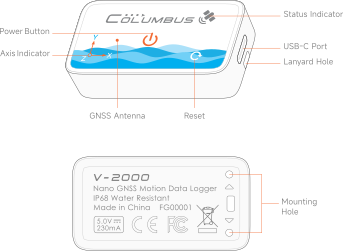
Status Indicator
Continuous Recording Mode (Double Flash)
No Fix (Fast Flash)
Fixed (Slow Flash)
Sleeping (Periodic Flash)
Low Battery
Interval Recording Mode (Single Flash)
Charging
Fully Charged
* It takes approximately 2.5 hours to fully charge a completely depleted battery.
Alerts
Storage Full
Buttons
Power Button
Press and hold: Power on / Power off
Short press when powered on: Mark the current location as a Point of Interest (POI)
Reset
Firmware update / Restart
Note: Do not press this button while recording, as this may result in loss of track data.
USB-C Port
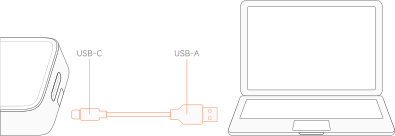
Connecting to a Computer
Connect the included USB-A to USB-C cable to a computer for charging and data transfer.
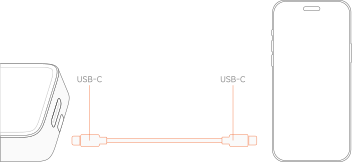
Connecting to a Mobile Device
Connect a USB-C to USB-C cable (not included) to a mobile device for charging and data transfer.
Indicators
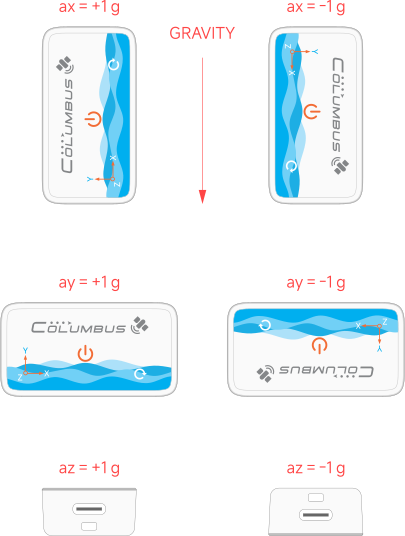
Axis Indicator
The device's orientation in space corresponds to the acceleration values recorded in the track as follows:
* Acceleration values can be recorded when using the FUSION track format.
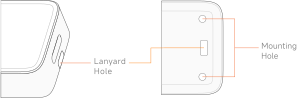
Mounting Hole
Strap Hole
Attach the included wrist strap here.
Mounting Holes
A 3D-printed base can be attached to these positioning holes.
< Before First Use
▲ Back to Top
Recording Your First Track >